

How it works
Set up once, and every order manages itself
When you install, the Onboarding Guide walks you through it step by step.
Configure your products
Pick a Shopify product and choose what it delivers: content only, or content and license keys.
Add your content and license keys
Upload the files you sell or add links to files you host elsewhere, and link them to your products. Then add license keys to each product that needs them.
Configure your settings
Set download and time limits, choose how returns and chargebacks are handled, and make the order status page your own.
Customers check out
As soon as an order is paid, keys are assigned and downloads unlock on the order status page.
The app handles the rest
Downloads and reveals are tracked. Returns, refunds and chargebacks are processed for you.
Features
From checkout to chargeback
Everything that happens to a digital order, handled for you.
Delivery
Automated Content and License Key Delivery
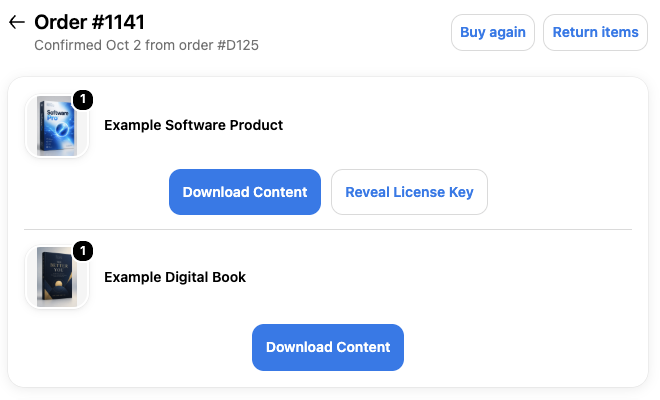
Configure your products once, and every order delivers itself. The moment an order is paid, each unit gets its license key from the product's pool, and its content unlocked on the customer's order status page.
- Delivered where customers already look. Content and keys appear on the order status page in their Shopify account. There's no separate portal or login, and no download emails to chase.
- Any file, any size: software, ebooks, audio and video, etc, or a link to files you host elsewhere.
- Update once, everyone gets it. Replace a file with a new version, or link new content to a product, and every past customer has it too
Protection
Return, Refund, and Chargeback Processing
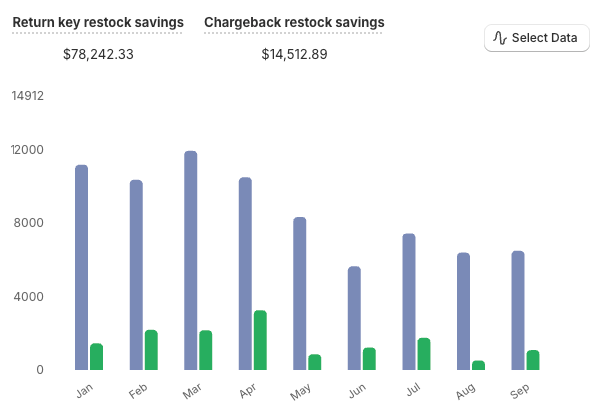
When an order is returned, refunded or disputed, the app takes the customer's access away for you, and can put license keys they never revealed back in stock, ready to sell again.
- Content and License Keys are protected. The app ensures resources are only accessible after the customer clicks the download or reveal buttons.
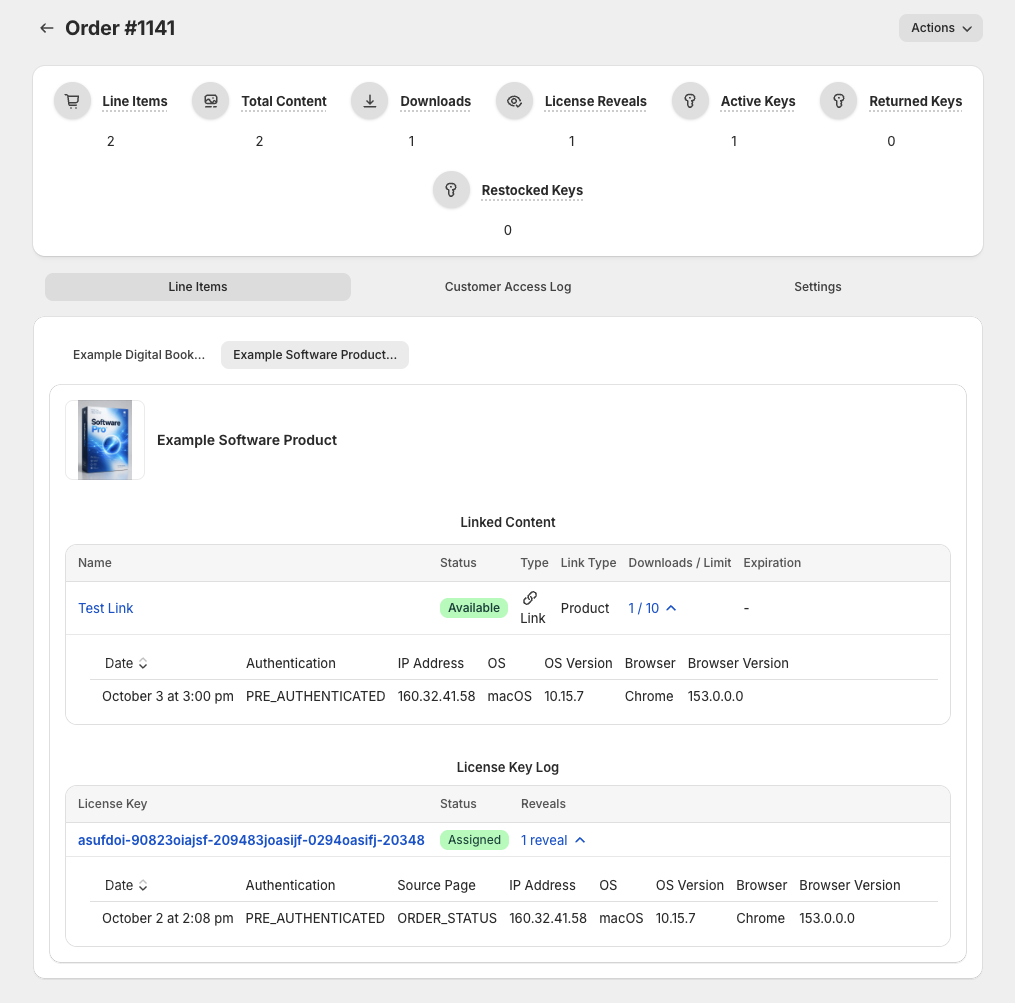
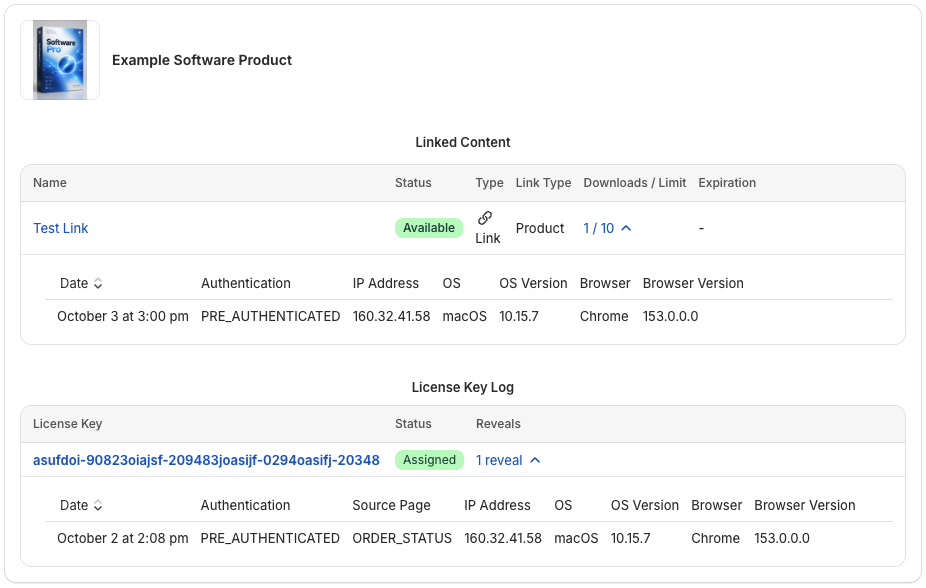
- Every download and reveal is logged. Never wonder if a customer accessed their content or revealed their license key again.
- Automatically manage customer access to content and keys for returned, refunded, and disputed orders.
Tracking
Every Download, Reveal, and Action Tracked
See exactly what each customer did with their order: every download, every license key reveal, and every visit to their order status page is tracked.
- A complete record for all content and license keys - each license key's full history (assigned, revealed, returned, restocked or deleted), and every download of every file.
- Act on it automatically. Tag Shopify orders when a customer downloads or reveals, to filter them in your admin or use in Shopify Flow.
- Analytics that show the whole picture - orders, downloads, returns and restocks over time, your most popular products and content, and the storage and bandwidth your files use.
Control
Settings, Settings, and More Settings
Make the app work the way your store does. Set store-wide defaults, override them for a single product or file, and make the order status page look and sound like your brand.
- Speak your store's language. Call keys Serial Numbers or Activation Codes, label every button, and write the message customers see at each step - before a download, after a return, or when a limit is reached.
- Make every message your own with Dynamic Text - bold, links and lists, and data pulled straight from your Shopify metafields.
- Decide what runs on autopilot: restocking returned keys, syncing inventory, processing chargebacks and tagging orders. Customize each one to suit your store.
And much more…
The details that make selling digital products easier.
- Download limitsCap how many times each file can be downloaded, store-wide or per file, and reset a customer's count.
- Time limitsClose downloads a set time after the order, and give a customer a fresh window when they need one.
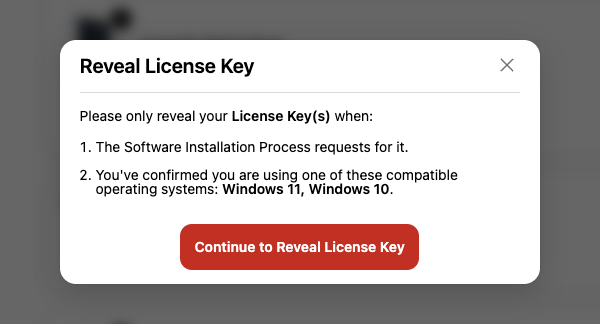
- Key reveal controlsKeep revealed keys on screen, and remind customers that revealed keys can't be refunded.
- Revoke and restore accessTake away an order, a line item or a single file without deleting anything, and give it back later.
- Inventory syncShopify's inventory follows each product's available keys, so you stop selling before you run out.
- Unused key restockPut keys customers never revealed back in stock after a number of days you choose, store-wide or per product.
- Duplicate key protectionMake sure a key can only ever belong to one product, so it's never sold twice.
- Key metadataKeep private notes on your keys, such as the supplier, invoice or purchase order. Customers never see them.
- One-off deliveriesAttach files or links to a single order, for custom or made-to-order items.
- Temporary linksCreate a private link to any of your files that works for 24 hours.
- Daily order syncA daily check keeps every order in step with Shopify, and tells you what it fixed.
- Staff permissionsGive support staff view-only access, or choose exactly what each person can do.
- Analytics and exportsFollow orders, downloads, returns, restocks, storage and bandwidth, and export your data to CSV.
FAQ
Questions, answered
Can't find what you're looking for? Contact us. We usually reply within 24 hours.
How do customers get their downloads and license keys?
On their order status page, in Shopify's customer accounts. They reach it from the link in their order confirmation email, or from their account. You add the Digital Content Manager block to that page once, and it appears on every order with a digital product. See what customers see.
What kinds of files can I sell?
Almost any: installers (.exe, .dmg, .pkg), disk images, archives (.zip, .rar, .7z), documents, ebooks, audio and video. Large files are fine; they upload in parts. You can also link to files you host elsewhere, such as a cloud drive, and links don't use any of your storage or bandwidth. Adding content.
Can one product deliver several files?
Yes. Link as many files or links to a product as you like. Customers get one button that opens a list of everything on the product, with how many items there are and their total size. Linking content.
Can I update a file after customers have bought it?
Yes. Replace a file with a new version and every customer who has it gets the new one. Link new content to a product later, and past customers get that too. Updating content.
Can I deliver something to just one customer?
Yes. Attach files or links to a single order's line item, for custom or made-to-order work, without linking them to the product for everyone. Custom products.
What happens when an order is returned, refunded or disputed?
The customer loses access to what they returned or were refunded for, and keys they never revealed go back in stock, ready to sell again (if setting active). With Chargeback Processing on, a dispute takes away access to the whole order. Returns, refunds and chargebacks.
Can I limit how often, or for how long, customers can download?
Yes. Set a download limit, a time limit, or both, for your whole store or a single piece of content. You choose the message customers see when they reach a limit, and you can reset a customer's limits from their order. Customer access.
A customer hit their download limit. Can I help them?
Yes. From their order you can reset their download count, give them a fresh time window, or restore access you took away earlier. Editing an order.
Can customers share their download links?
Not in a way that lasts. The download buttons never point at your files directly. Each one carries a temporary link that works for about two hours, and every time it's used, the app checks the order first. It makes sure that the customer still has access, hasn't returned the item, and is within any download limit, only then is the file sent.
Can my staff use the app with limited access?
Yes. By default, every staff member has full access. When you want more control, turn on individual permissions and decide what each user can do. Start from a preset, such as Customer Support (can view everything but change nothing), or pick their permissions one by one. Staff and permissions.
What's new
Always Improving
We use Digital Content Manager in our own stores, so it keeps getting better.
- Content Export
Export on the Content Management page now allows you to export your content library as a CSV file, with a download link for every file.
- License Keys Enhanced Security
Now, license keys only show when a staff member has the correct permissions to view them. All previous data leaks have been fixed.
- License Keys in Alerts Need Permission to View
Alerts on the dashboard now only show license keys to staff who have permission to view license keys.
Ready to automate your digital deliveries?
Install Digital Content Manager, follow the Onboarding Guide, and your next order manages itself.